Tremor: A Unique Display Font That Adds Creative Energy to Your Designs
Typography plays a crucial role in design, and choosing the right font can elevate your project from ordinary to extraordinary. Tremor is a display font that stands out with its distinctive trembling style, offering a fresh and dynamic visual element to any design. Whether you're working on branding, digital content, or creative projects, Tremor brings an artistic flair that captures attention and adds personality.
What Is Tremor?
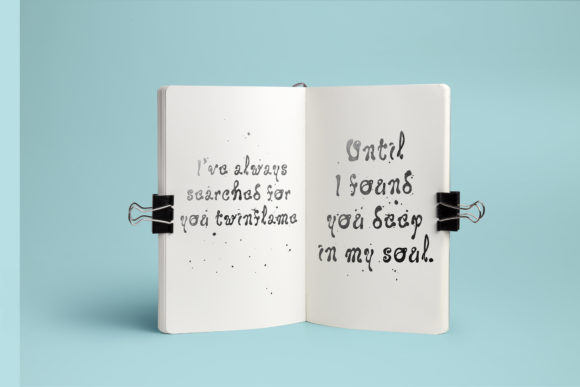
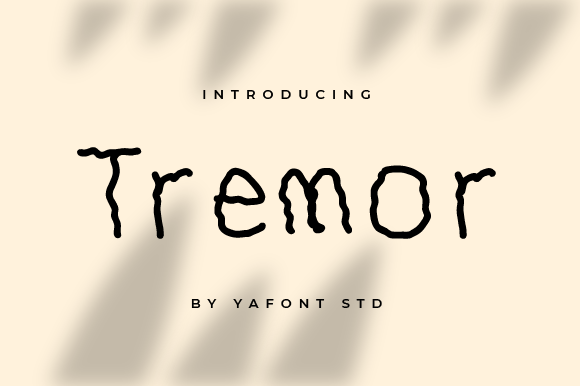
Tremor is a display font designed to mimic the look of a trembling hand or shaky motion. This unique feature makes it ideal for projects that require a sense of movement, urgency, or emotional expression. Unlike traditional fonts that follow strict geometric or serif styles, Tremor uses subtle variations in stroke weight and line placement to create a sense of instability and energy.
The font is available in multiple weights and styles, allowing designers to customize the intensity of the tremor effect based on their needs. Its versatility ensures that it can be used in various contexts while still maintaining its signature appearance.
Why Use Tremor in Design?
The primary appeal of Tremor lies in its ability to convey emotion and movement through typography. It's particularly effective when used in headlines, logos, or promotional materials where a more expressive typeface is desired. The trembling effect can evoke feelings of excitement, nervousness, or even playfulness, depending on how it's applied.
- Attention-grabbing: The irregularity of Tremor makes it stand out in a crowd of standard fonts.
- Emotional impact: It can communicate urgency or excitement without the need for additional text.
- Creativity boost: Using Tremor encourages experimentation and helps break away from conventional design norms.
For designers looking to add a unique touch to their work, Tremor offers a compelling alternative to more traditional typefaces.
Where Can You Use Tremor?
Tremor is best suited for use in situations where the goal is to draw attention or express a particular mood. Some common applications include:
- Headlines and titles: The trembling effect works well for creating dramatic or eye-catching headlines.
- Logos and branding: It can be used as part of a logo to give it a dynamic feel.
- Digital banners and ads: The motion-like quality of Tremor makes it suitable for online advertisements aiming to capture user attention quickly.
- Event promotions: It can be used in posters or flyers for events that have a high-energy theme.
However, due to its stylized nature, Tremor may not be appropriate for all types of content. For instance, it might not be the best choice for body text or formal documents where readability is essential.
Who Benefits From Using Tremor?
Tremor appeals to a wide range of users, including:
- Graphic designers: Those who want to experiment with unconventional fonts and push creative boundaries.
- Marketers: Looking to create engaging content that stands out in crowded digital spaces.
- Content creators: Who want to enhance the visual appeal of their social media posts, blogs, or videos.
- Business owners: Seeking to develop a brand identity that feels modern and distinct.
Anyone involved in visual communication can benefit from incorporating Tremor into their workflow, provided they understand its strengths and limitations.
Strengths of Tremor
The main strength of Tremor is its ability to add a unique and memorable visual element to any design. Here are some of its key advantages:
- High visual impact: The trembling effect immediately draws the viewer’s eye and creates a strong first impression.
- Flexibility: Available in multiple weights and styles, it allows for a variety of creative expressions.
- Easy to use: Most design software supports Tremor, making it accessible for both beginners and professionals.
- Time-saving: It eliminates the need to manually create a trembling effect using other tools or techniques.
These features make Tremor a valuable addition to any designer's toolkit, especially when the goal is to make a statement with typography.
Considerations When Using Tremor
While Tremor has many benefits, there are also some factors to consider before using it in your projects:
- Readability: Due to its irregular structure, Tremor may not be easy to read at smaller sizes or in long blocks of text.
- Context matters: It may not be appropriate for all types of content or audiences. For example, it could be distracting in academic or professional settings.
- Licensing: Always ensure you have the proper license to use Tremor in commercial projects.
- Compatibility: While widely supported, it's always a good idea to test the font across different platforms and devices to ensure consistent rendering.
Understanding these considerations will help you determine whether Tremor is the right fit for your specific needs.
Real-World Examples of Tremor in Action
To better understand how Tremor can be used effectively, here are a few real-world scenarios:
Example 1: A music festival poster uses Tremor for the headline "Feel the Beat" to create an energetic and exciting atmosphere.
Example 2: A startup company incorporates Tremor into its logo to reflect innovation and a bold approach to business.
Example 3: A social media influencer uses Tremor in their caption text to add a playful and engaging tone to their posts.
These examples illustrate how Tremor can be adapted to suit different purposes while maintaining its core identity.
Evaluating Whether Tremor Is Right for Your Project
If you're considering using Tremor, ask yourself the following questions:
- Does my project require a unique or attention-grabbing typographic style?
- Will Tremor enhance the message I'm trying to convey, or will it distract from it?
- Is the font readable and appropriate for the intended audience?
- Do I have the necessary licensing rights to use Tremor in this context?
By carefully evaluating these factors, you can make an informed decision about whether Tremor is the right choice for your design needs.
In conclusion, Tremor is a versatile and creative display font that can add a unique dimension to your designs. Whether you're a designer, marketer, or content creator, exploring Tremor can open up new possibilities for expressing ideas visually. As with any design tool, it's important to use it thoughtfully and appropriately to achieve the best results.